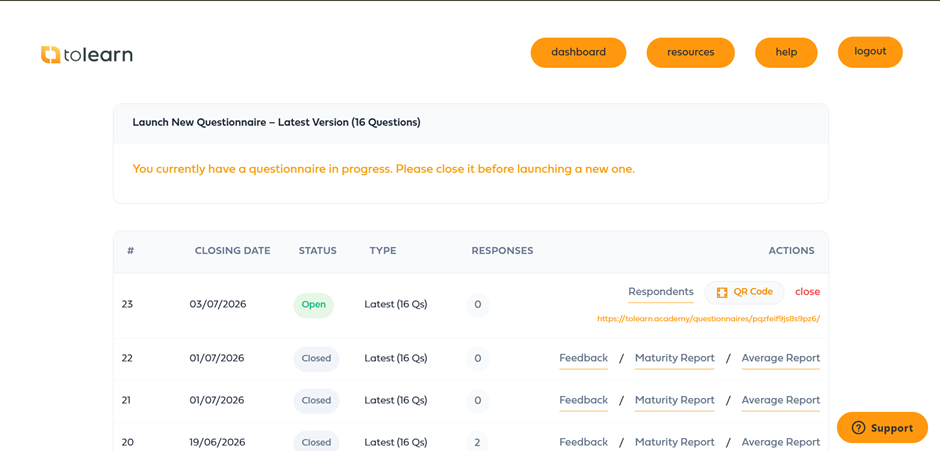
After a questionnaire has been launched, it will appear in the questionnaire history table. This area allows group leaders to monitor participation, share questionnaire access with users, manage active questionnaires, and review results once a questionnaire has been completed.
Understanding the available options within this table will help you monitor response rates and analyse food safety culture trends across your organisation.
Understanding Questionnaire Status
Each questionnaire displays its current status.
Open
An open questionnaire is currently accepting responses from users.
While a questionnaire is open, users can continue to submit their responses until either:
The closing date is reached, or
The questionnaire is manually closed by a group leader.
During this period, the main focus is monitoring participation and encouraging users to complete the questionnaire.
Closed
A closed questionnaire is no longer accepting responses.
Once a questionnaire has been closed, reporting options become available, allowing you to review feedback, analyse results, and compare performance against previous questionnaires.
Monitoring Participation
While a questionnaire remains open, the Respondents option allows you to monitor response activity.
The respondents' report provides visibility of how many users have submitted responses and can help identify areas where participation may be low.
This information can be particularly useful when monitoring engagement across different sites, departments, or employee groups.
If response numbers are lower than expected, reminders can be issued before the questionnaire closes.
For detailed information about participation reporting, see the Respondents Report article.
Sharing Questionnaire Access
Most users will access the questionnaire directly through their learning area once it has been launched.
However, there may be situations where a user cannot locate the questionnaire or where you wish to distribute it directly.
For active questionnaires, a unique questionnaire link is available within the questionnaire table. This link can be shared directly with users, allowing them to access the questionnaire without navigating through the platform.
Some academies also provide a QR code option. This allows group leaders to download a QR code linked to the active questionnaire. Users can then scan the code using a mobile device and access the questionnaire instantly.
This feature is particularly useful during team meetings, workshops, training sessions, or when displaying the questionnaire on noticeboards and printed communications.
Closing a Questionnaire Early
Questionnaires will automatically close on the selected closing date.
However, if all required responses have been received or you need to begin analysing results sooner, the questionnaire can be closed manually.
Once a questionnaire has been closed:
Users can no longer submit responses.
Participation figures are finalised.
Reporting options become available.
Results can be analysed and compared with previous questionnaires.
Reviewing Questionnaire Results
After a questionnaire has been closed, additional reports become available within the Actions section.
These reports help organisations understand employee feedback, measure culture maturity, and track improvements over time.
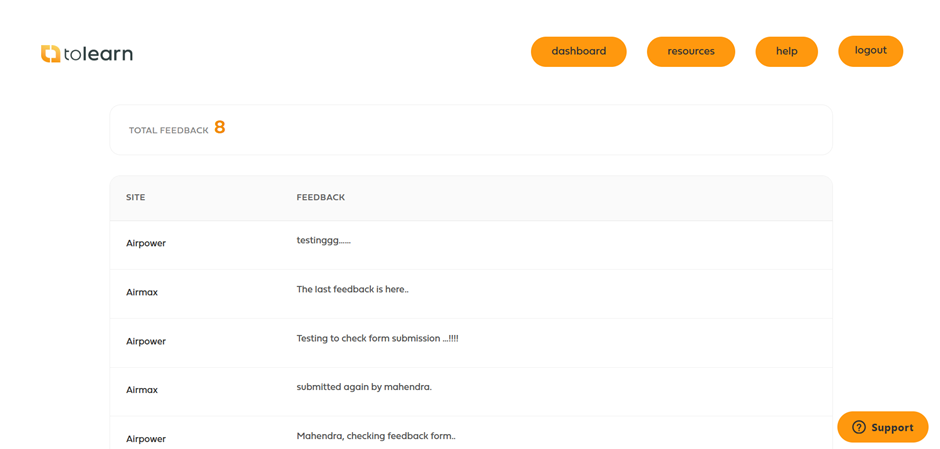
Feedback Report
The Feedback Report provides access to comments and feedback submitted by users during the questionnaire process.
This report can help identify common concerns, improvement opportunities, and areas where additional support or communication may be required.
Maturity Report
The Maturity Report helps organisations assess food safety culture development over time.
By comparing questionnaire results, organisations can identify trends, measure improvement initiatives, and understand how culture maturity is changing across the workforce.
Further information is available in the Maturity Report article.
Average Report
The average report provides a more detailed comparison between questionnaires.
This report allows organisations to compare questionnaire results at a question level, review score variances, and identify specific areas of improvement or decline.
Further information is available in the Average Report article.
Understanding Response Numbers
The Responses column displays how many completed questionnaires have been submitted.
Monitoring response numbers throughout the questionnaire period can help ensure sufficient participation before results are reviewed.
Higher participation levels generally provide a more accurate representation of food safety culture across the organisation.
Platform Variations
Food safety culture functionality may vary between academies.
Some academies include QR code functionality, while others provide questionnaire access through direct links only.
Report layouts and navigation may also differ between platforms. However, the overall process remains the same: questionnaires are launched, users submit responses, participation is monitored, and reports are used to analyse food safety culture performance and trends.
Was this article helpful?
That’s Great!
Thank you for your feedback
Sorry! We couldn't be helpful
Thank you for your feedback
Feedback sent
We appreciate your effort and will try to fix the article